For restaurants in Thailand
Run your whole restaurant from your phone
Menu, QR ordering at the table, the kitchen screen, stock and your books — one place, in Thai, on the phone you already carry.
Free to start. Business plan is ฿669/mo
Per shop. Two businesses means two plans.
That is the real price. No sales call, no quote to request.
Prices include 7% VAT · Ask for a full tax invoice via LINE OA
The photographs on this page are AI-generated. The product screens are real screenshots of FlareApps.
What you can check about us
- Operated by Flare Agency Co., Ltd. · 670/352 ซอยสุทธิพร ดินแดง กรุงเทพ 10400 · Company registration no. 0105555049713
- A real person reads and answers what you send us · Mon–Sat 09:00–17:00 (Thailand time) · Outside those hours your message is recorded and waits for us — we don't promise a reply time yet; live status is at Platform status
- LINE is our only social channel — we do not have a Facebook page yet
- Ask for a file of your account data yourself — 41 sections, and the file states its own scope inside it · a business's own records are a separate set · ask us to delete your account, with a 30-day grace period before anything is erased · Privacy policy
- Everyone on your team sees only what they should — roles and permissions from day one.
- FlareApps itself has been in development since 2023 · The company has been registered in Thailand since 2012
- 36 ready-made website designs to start from
- Platform status, the changelog and the issue tracker are all public · We are in beta — what is not built yet is written down in the changelog rather than left out · Platform status · Changelog · Report an issue
- Two-factor authentication (TOTP) with backup codes, and a session and device registry you can review and revoke yourself · When you set a password we hash it with Argon2id, and the secrets we hold for you — two-factor codes, saved passwords, the sign-in tokens from Google and LINE, and integration keys — are encrypted before they are stored. For your password vault we also keep the key, so it opens on any device you sign in to.
- Your servers, databases and uploaded files are on AWS in Thailand — your Aria conversations and video transcoding are processed in Singapore · AI work is processed in Singapore, the United States or Google's global network · every other provider we use is listed in the privacy policy
- The price you see on the pricing page is the price we charge
Getting started
When you set up your shop, we ask what kind of place it is
Setting up starts with an account, then a few short answers about your shop. One of them is what kind of place you run — pick the way of running a place that matches yours, or, if none of them does, describe your shop in a sentence and let the system read it.
The system offers. You confirm.
Until you tap yes, nothing is saved. The system never guesses your answer and writes it down anyway.
It can only offer what exists
It offers only the ways of running a place that are listed on this page. It never invents a new one, and picking one yourself is always there.
What you edit yourself is never removed
Everything prepared for you is a sample: rename it, reprice it, throw it away. A row you have edited yourself stays when you clear the samples.
See the screen
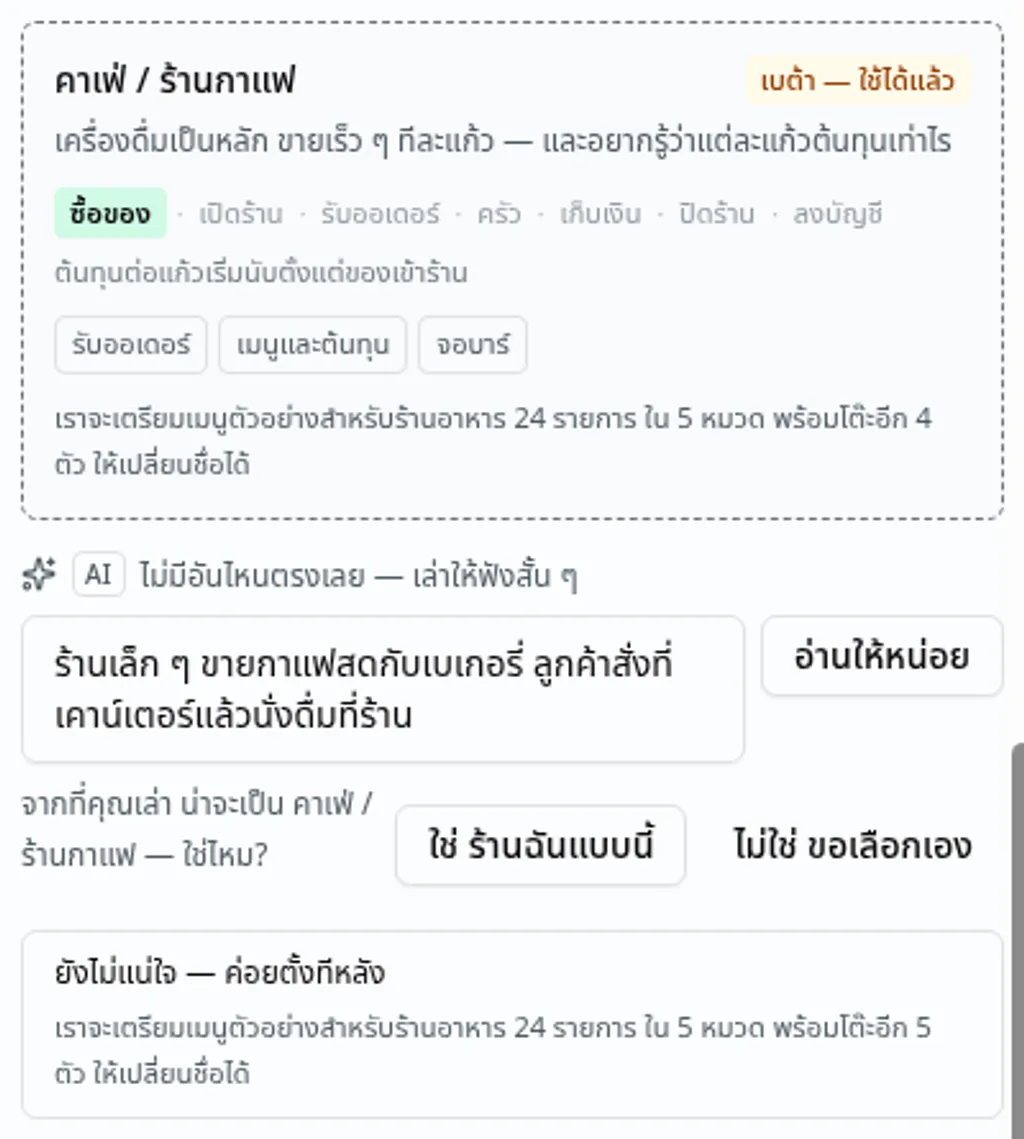
The real screen: from the sentence typed into the box, the system offers «คาเฟ่ / ร้านกาแฟ», with a button to confirm, a button to pick for yourself, and a button to leave it for later · ภาพจากระบบจริง · ข้อมูลตัวอย่าง
A day in your shop
Your day, on the screens you would actually use
1Buying and receiving
1
Buying and receiving
Raise an order with your supplier. When it arrives you receive it in, and the cost of every item goes into stock with it — nothing to key in twice.
The Procurement and Inventory panels
See the screen
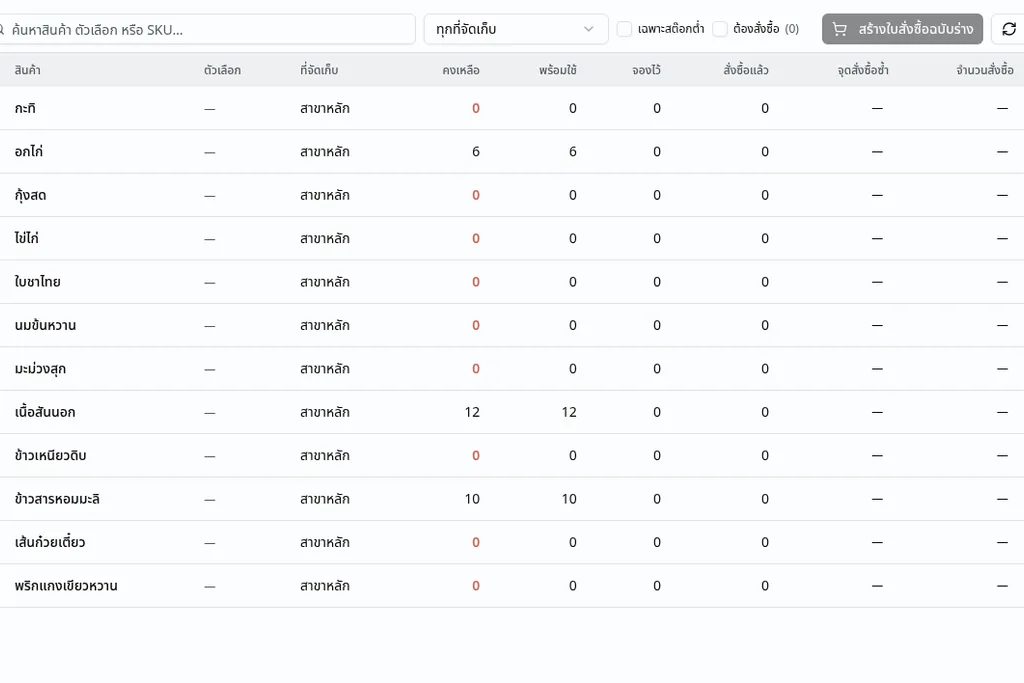
The shop's ingredient stock — the three lines just received now show what is on hand · ภาพจากระบบจริง · ข้อมูลตัวอย่าง
2Opening up
2
Opening up
Open the tablet at the front. The whole floor is on one screen, so you can see at a glance which tables are seated — and your online menu is already up for guests to scan.
The shop screen and your published menu
See the screen
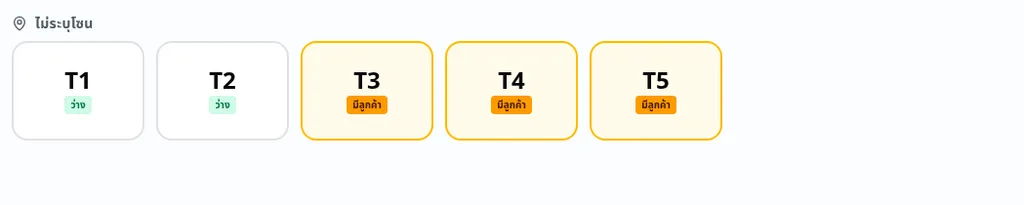
The floor screen — every table in the shop on one screen · ภาพจากระบบจริง · ข้อมูลตัวอย่าง
3Taking the order
3
Taking the order
A guest scans the QR on her table and orders from her own phone, or a member of staff keys it in at the front. Both land in the same place.
The floor screen
See the screen

The shop's own menu on the floor screen — tap to add it to the table's order · ภาพจากระบบจริง · ข้อมูลตัวอย่าง
4In the kitchen
4
In the kitchen
The order is on the kitchen screen the moment it is sent. Your cook marks it started, then done. If you have linked recipes to ingredients and switched stock deduction on, it comes off stock here.
The kitchen screen
See the screen
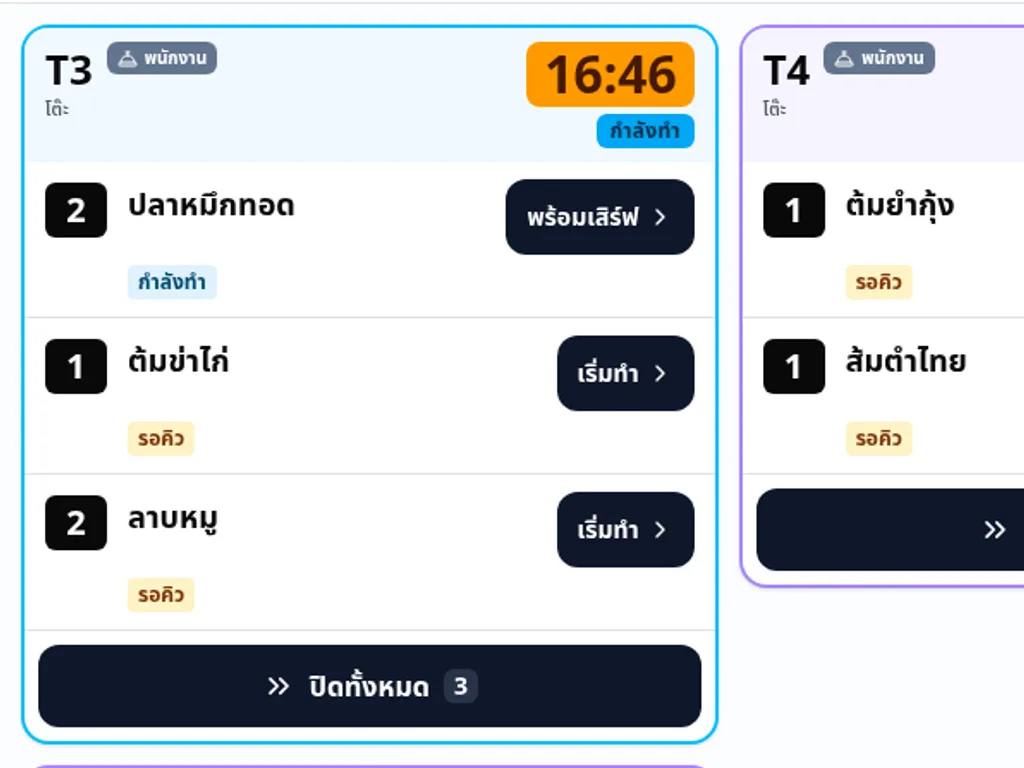
An order on the kitchen screen — the cook has started one line, the others are still queued · ภาพจากระบบจริง · ข้อมูลตัวอย่าง
5Settling up
5
Settling up
Pull up the table's bill, take the money at the counter, and record how it was paid. Change due is on the screen.
The counter screen
See the screen
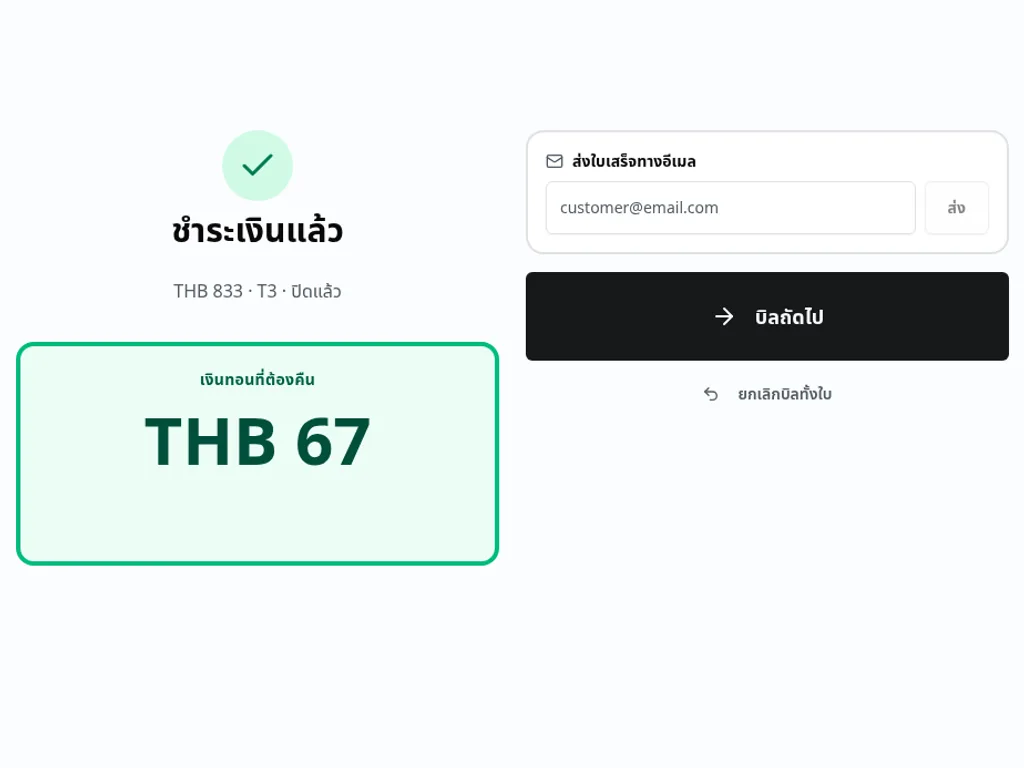
A bill settled in cash, with the change due · ภาพจากระบบจริง · ข้อมูลตัวอย่าง
6Counting up and paying staff
6
Counting up and paying staff
Today's takings, split by how they were paid, are in the Orders panel; the same day's hours, staff by staff, are in the Team panel.
The day-close drawer and the team timesheet
See the screen

Today's takings, split by how the guest paid, with the cash from today's sales · ภาพจากระบบจริง · ข้อมูลตัวอย่าง
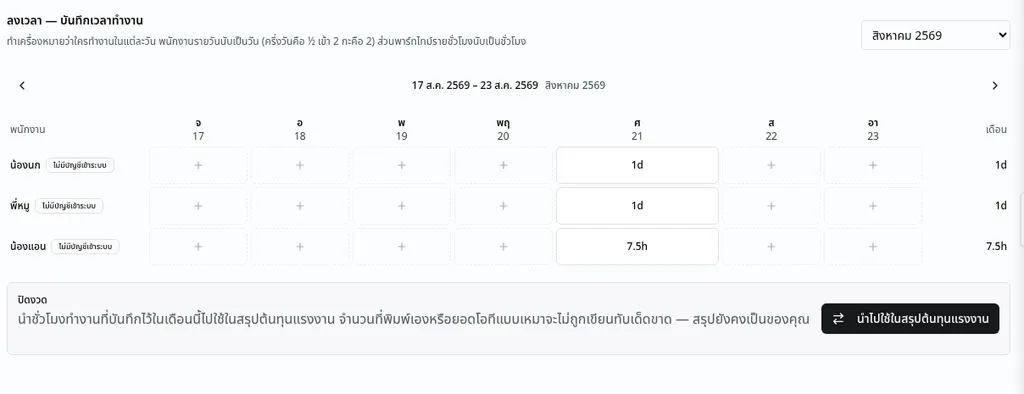
The same day on the timesheet — who worked, with hourly staff counted in hours · ภาพจากระบบจริง · ข้อมูลตัวอย่าง
7Closing the books
7
Closing the books
The day's sales are already accounting entries — not a number you retype at month end. Withholding-tax rates are read from a rate table we maintain, each with the date it took effect and the provision it comes from.
The Finance panel
See the screen
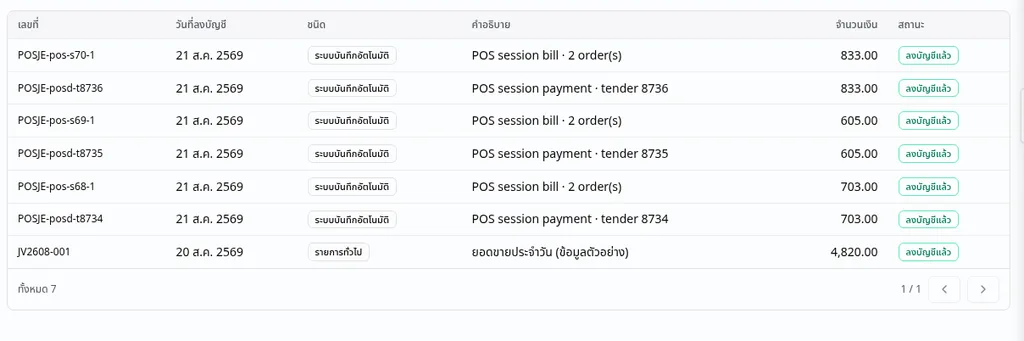
The journal — today's settled bills, posted by the system · ภาพจากระบบจริง · ข้อมูลตัวอย่าง
These are screenshots of the real system with sample data. Your own numbers live in your own account.
Which kind of place is yours?
The ways of running a place that are switched on today are the cards below, each carrying its own state; the ones that are not ready yet appear as a line underneath them. If yours is not here, the list further down says so plainly.
Opening a new place
Build the menu with what each dish costs you, print a QR for each table, and take your first order from one of them.
See this step in the working day
Beta — available now
Order at the table, pay after
Guests scan and order from the table, the kitchen sees it at once, and the bill is settled at the end.
See this step in the working day
Beta — available now
Order at the counter, pay first
Staff key the order in and take the money before it goes to the kitchen. The day closes off the same screen.
See this step in the working day
Beta — available now
Café and drinks
A short menu with options, cost per cup, and a bar screen instead of a kitchen one.
See this step in the working day
Beta — available now
What you need to buy
Nothing. It runs in the browser on the tablet or phone you already have — there is no app to install and no machine to rent.
- One tablet or spare phone at the front, for staff
- Your guests use their own phones — nothing to install
- Any screen in the kitchen that opens a browser

Bringing your existing menu across
Send us photos of the menu you have and our team moves it across for you — dishes, prices and options. Talk to us first and we will tell you what we need.
Already keep your menu in a spreadsheet? You can upload it yourself as a file, and map your own columns.
A menu that is actually live
This is a real FlareApps menu site, published and running. Open it on the phone you are reading this on.
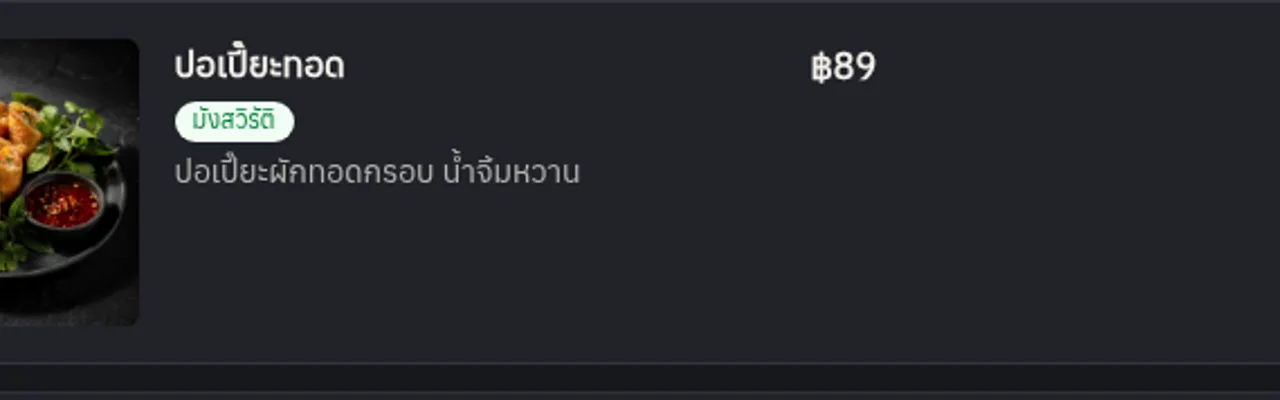
A dish on the published menu, as a guest sees it · ภาพจากระบบจริง · ข้อมูลตัวอย่าง
An assistant that knows your shop
Ask in Thai, about your own numbers — not about restaurants in general.
- “What does this dish cost me to make?”
- “What are we running low on?”
- “How many hours did Nok work this week?”
- “Take the crab curry off the menu” — it shows you what it is about to do and waits for your yes. It never changes your data on its own.
The price, and what is in it
One plan for a shop. There is a free plan too — it is on the price page with everything it includes.
Venture
฿669per shop, per month
One shop, one plan. If you run two businesses, each carries its own.
- 50 GB storage
- Up to 10 GB per file
- Audio, video and code files too
- In-pack AI reserve — used after the free pool
Not yet supported — when it works, it will be on this page with its price
- More than one branch, or a franchise
- A link to the food ordering apps — Grab, LINE MAN, Robinhood, foodpanda
- Takeaway and delivery orders
- Printing kitchen dockets or paper receipts
- Carrying on while the internet is down
- Taking your guests' money through the website
- Filing your own PND 50 and PND 51 corporate tax returns
- One booking is priced at one rate, so a buffet cannot split adult and child prices at one table
Questions people ask before they start
Can it connect to Grab, LINE MAN, Robinhood or foodpanda?
Not yet. Orders reach the system two ways today: a guest scanning the QR at her table, or a member of staff keying it in at the front. If that changes, it will be on this page.
Can it print a kitchen docket or a paper receipt?
Not yet. The kitchen reads the order on a screen, and a receipt can go out by email. There is no printing.
A guest messages us on LINE to order. Does that reach the system?
Not yet. Only the two ways above reach the system. A LINE message still has to be keyed in by hand.
Can we keep working if the internet drops?
Not yet. The screen shows that it is reconnecting, and picks up on its own when the connection returns. New orders cannot be taken in the system in the meantime.
Can it take takeaway or delivery orders?
Not yet. What the system does today is eating in — ordering at the table, and keying in at the front.
How many shops does one plan cover?
One shop, one plan. The system holds one active business plan per business at a time.
I have two businesses. Do I pay for two plans?
Yes — one plan each. One account can hold more than one business, and each business carries its own plan.
Who shows us how to use it?
A person does. Ask on the form below or on LINE, and tick the box asking the team to help you set it up — that tick reaches the same people.
If we stop using it, where is our data?
You can download the whole account. You can ask for it to be deleted, with a 30-day grace period before anything is removed for good. And you can pull the month's orders out as a file for your bookkeeper.
Can we bring our existing menu across?
Yes. Send us photos of the menu you have and our team moves it across for you. If you already keep it in a spreadsheet, you can upload that yourself instead.
Can guests pay through the website?
Not yet. You take the money at the shop and record how it was paid.
Can it run a buffet, or price per head?
Yes. You can price a sitting per head, unlimited, and a guest sees the per-head price and the total for their headcount before booking. Four things it does not do yet: there is no separate child price; the dine-in bill is not totalled from the headcount; one booking is priced at one rate, so adults and children at one table cannot be split; and a guest can see and book this price for herself only on a booking page — a QR menu site does not carry one — while the party standing in front of you is written up and charged at the same per-head price from Orders > Reservations > Book for a customer, which prints a receipt to hand over.
We use another point-of-sale today. Can we move?
Yes — the menu and its prices move: send photos or a spreadsheet and our team sets it up. Your old sales history stays in the system you have.
Still have a question? Just ask
Ask us anything before you sign up — how it fits your shop, what it costs, whether we can move your menu across. A real person reads these, and replies on LINE, by phone or by email — whichever you leave below.
Try it with your own menu
Start free, put one dish in, and print a table QR. If it is not for you, nothing has been spent.
FlareApps is in beta. What we price is what we charge, and every capability we name is something the product enforces today. You do not have to decide today. The free plan has no time limit and no card.